
Product Product overview Orders & product models Production planning Shop floor Inventory & materials Work centers, people & working time Documents, communication & traceability
NeXaPortalPricingGetting startedRoadmapCompany
Book a demo Log in

Shop floor

The next job – and everything it takes to do it

Work-center and personal queues show the operator the next task with its instructions, materials and dependencies. Confirmations are recorded against the job being done – on a tablet, a phone or a work-center terminal.

How it works

Work queue → Execution → Completion

01

Work queue

The operator sees their own and their work center’s queue in order of urgency. The task shows the order, stage, instructions, materials and team.

02

Execution

Start, join, pause or hand the work over. Several people can participate in the same task, and working time is recorded for each of them separately.

03

Completion

On completion, quantities, material consumption, quality observations and lots are recorded. Actuals update the order and the plan immediately.
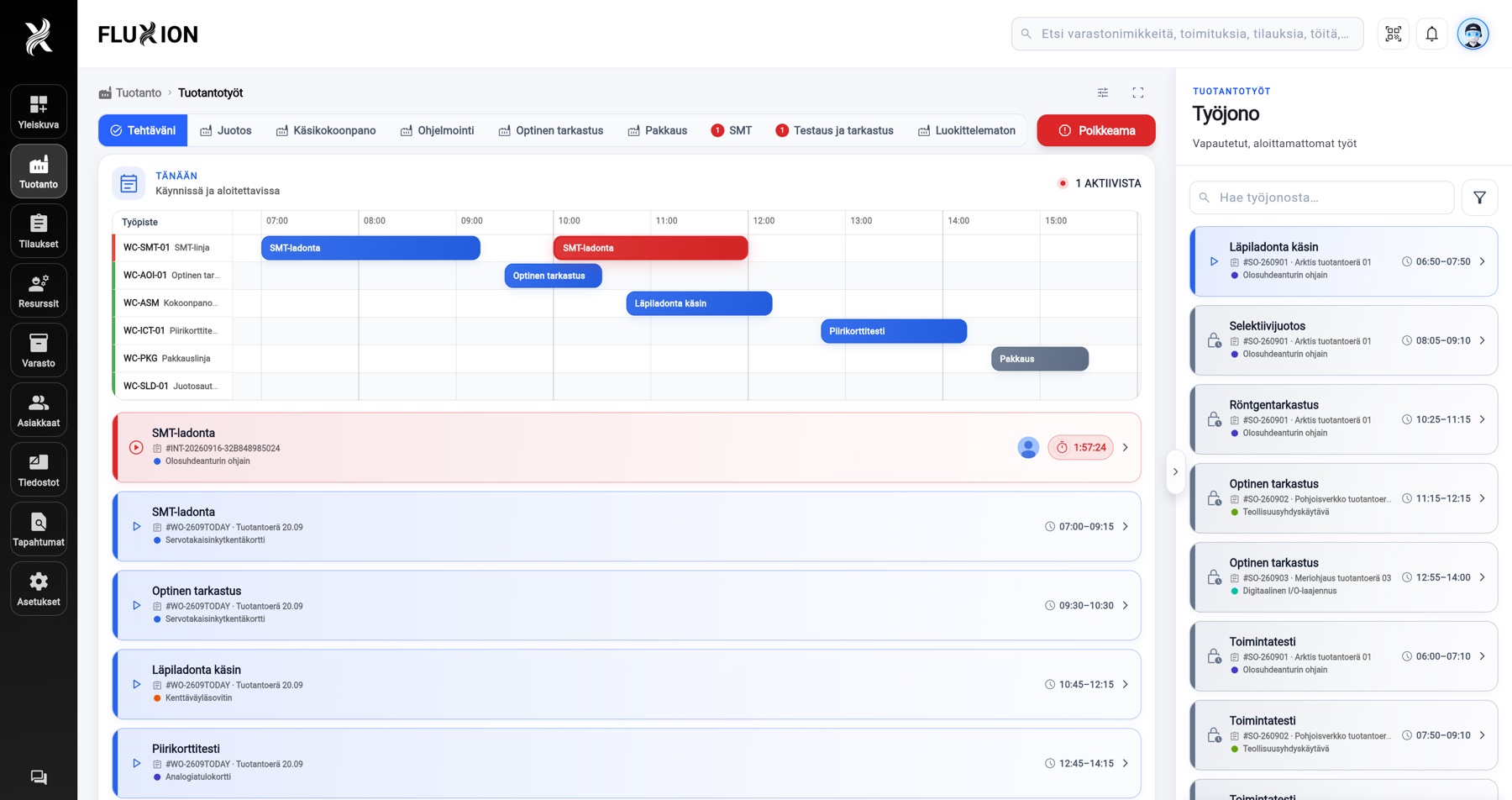
app.fluxion.fi
FluXion shop-floor view: the task in progress with its timer, the day’s tasks per work center on a timeline and the released work queue
An operator’s day on the shop floor: the task in progress with its elapsed time, the day’s tasks per work center on a timeline, and the released queue the next task is started from.Screenshot from the FluXion Demo workspace. All records shown are demo data.

Handling anomalies

Record and handle problems efficiently

A fault, shortage or quality defect is recorded in seconds where it is noticed – on a phone or the work-center terminal. Supervisors see every open problem in one list, take ownership and resolve them one at a time. The reporter is told when it is done.

  1. 01 · Operator

    Record

    What did you notice? Type or dictate, add a photo and send. Link the report to a work center, task or order with a couple of taps – the work context is captured automatically. Work continues right away.

    Dictation Photos and videos Linking
  2. 02 · Supervisor

    Handle

    Open problems sit in one list in order of severity: what blocks work, what can wait. Take ownership or assign the report to the right person – one action at a time, no guesswork.

    Work blocked Work impaired Work can continue
  3. 03 · Supervisor and reporter

    Resolve

    Record the resolution and the reporter is told right away. Photos, comments and handling steps stay in one stream – in the history of the work center, task and order.

    Reporter notified Activity stream
Notifications and the event log
One list
Reported and system-detected anomalies in the same view by severity – no separate channels.
One owner
Every report has an owner. An unassigned report is visible to all supervisors until someone takes it.
One stream
Photos, comments, classification and the resolution stay in the report – and the report in its item’s history.

Capabilities

Shop floor

Work-center and personal queues
The next job by urgency. Supervisors see starts and completions in real time.
Instructions on the task
Instructions, required equipment, acceptance criteria and attachments open straight from the task.
Recording and handling problems
A fault, shortage or quality defect is recorded where it is noticed – with photos and by voice. Supervisors handle reports from one list, and the reporter is notified of the outcome.
Start, pause, join and hand over
One tap per action. A handover passes responsibility to the next person, who accepts it from their own view.
Teamwork on the same task
Several participants on one task. Each person’s time is recorded separately, and anyone can leave while the others continue.
Execution profiles
Individual, team, continuous handover or unattended – the profile defines how the work may continue.
Picking and material consumption
Pick materials for the task and record consumption on completion. Shortages and substitute lots are handled in the same view.
QR scanning
Items, locations and tasks are scanned with a camera or a reader. Every code is checked against the right workspace.
Working time and workday review
Clock-in, breaks and task participation. At the end of the day, open work is reviewed in one step.
Exception notifications
Unowned active work or an overdue handover is raised to supervisors automatically.

Frequently asked questions

Does the shop-floor view work on a phone?
Yes. FluXion is available as iOS and Android apps, and the shop-floor views, confirmations and scanning are designed for touch. A shared tablet at the work center works just as well.
What happens when work is unfinished at the end of a shift?
Work can be handed over to the next shift, which accepts the handover from its own view. The continuous handover and unattended profiles keep the work running without losing ownership.
How does an operator report a fault or a shortage?
The task, work-center and order views have a report action marked with a flag icon. The operator types or dictates the observation, adds photos and sends it – category and impact can be left for the supervisor to fill in. A report can also be made from the work center’s shared tablet without a personal phone, and the reporter is notified when it is resolved.

Next step

See and experience FluXion

Book a 30-minute demo where we walk through the stages of your production – not a generic tour.

Send a contact request

* Required field. We use your details only to get back to you. Privacy notice